If your roofing business isn’t in Google’s Top 3 search results, you’re missing out on local customers. In 2026, 70% of homeowners choose roofers from the Google Map Pack, and 80% start their search without a specific company in mind. Your Google Business Profile (GBP) is now a critical tool for visibility, as Google’s AI features like Overviews and Gemini rely on it to answer customer questions directly.
Here’s what’s new for roofing companies in 2026:
With these updates, roofing companies can improve visibility, attract more local leads, and save on high ad costs. Start by optimizing your GBP with accurate service areas, detailed descriptions, and high-quality visuals.
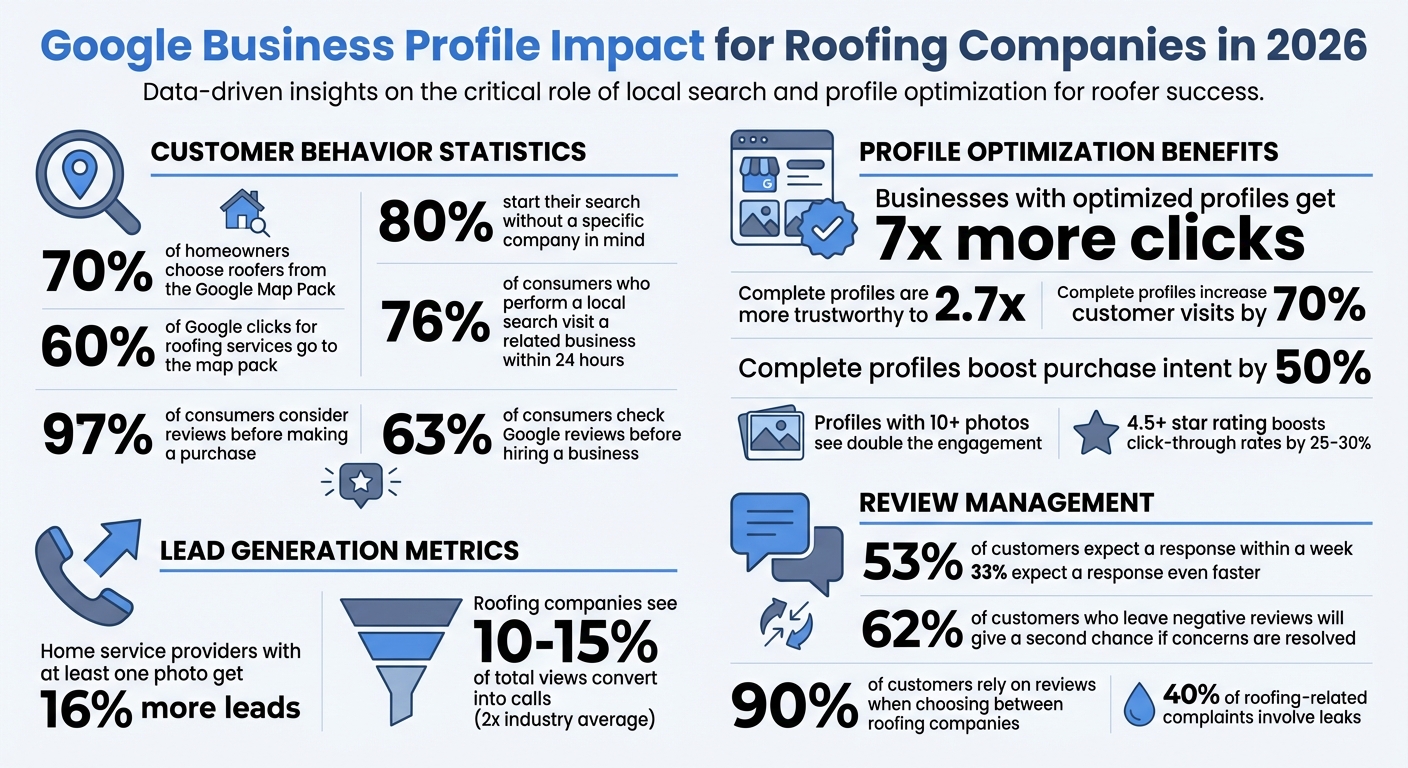
Google Business Profile Statistics for Roofing Companies 2026
A properly set up Google Business Profile (GBP) is crucial for helping local homeowners find you when they search for "roofers near me." For service-area businesses, the verification process can be more stringent, but the benefits are worth it. Businesses with complete profiles on Google Search and Maps are 2.7 times more likely to be seen as trustworthy by customers. Plus, a complete profile can increase customer visits by 70% and boost purchase intent by 50%.
To get started, head to the Google Business Profile site and sign in using your business email – not your personal Gmail account. Enter your business name exactly as it appears on your truck, signage, and marketing materials. Avoid adding extra keywords like "Joe’s Roofing – Best Roofer in Dallas – Emergency Repairs", as this could lead to suspension. If you work from a residential address without a storefront, you’ll need to hide your address from public view while still using it for verification purposes.
Once your profile is set up, the next step is verification. Let’s break down how to do it efficiently using 2026’s updated methods.
Verification is essential before your profile can go live. It not only builds trust but also improves your profile’s visibility and ranking. Google now prioritizes video verification for service businesses. You’ll need to show your branded work vehicle, license plate, and essential tools like ladders, nail guns, safety harnesses, and roofing materials. If video verification isn’t an option, you can still use the traditional postcard method, which typically arrives within 14 days. This updated process helps Google reduce fraudulent listings, which were a significant issue in the past.
If your business is already verified through Google Search Console using the same email, you may qualify for instant verification.
Tip: Always maintain "Primary Owner" status for your profile. If you’re working with a marketing agency, grant them "Manager" or "Site Manager" access only. This ensures you retain full control of your listing, even if you switch agencies later on.
After verification, the next focus should be selecting the right categories and attributes to strengthen your local presence.
The primary category is the foundation of your visibility. For roofing businesses, this should always be "Roofing Contractor". As Adam Sand from Roofing Business Partner advises:
"Your primary category should be Roofing Contractor. If you offer any additional services, use secondary categories like ‘Siding Contractor’ or ‘Window Installation Service’".
Secondary categories allow you to target broader searches. For example, if you install gutters, add "Gutter Service." If siding is a major part of your business, include "Siding Contractor." Google recommends choosing only the most relevant categories to describe your business. Adding too many unrelated categories can dilute your profile’s focus and hurt your rankings.
Your service area settings also play a big role in local visibility. Indicate that you deliver services to customers at their location and set a realistic service radius – typically around 20–30 miles. Avoid claiming an overly large radius (like 100+ miles), as Google may flag this as a sign you’re not a truly local business, which can negatively impact your ranking. In the Services section, break down your offerings into more specific terms. Instead of just listing "Roof Installation", include detailed services like "Asphalt Shingle Roofing", "Metal Roofing", or "Tile Roofing." Each service can have up to 1,000 characters of description, giving Google more context to match your profile with specific search queries.
Attributes are another way to stand out. Use objective options like "Online estimates" if you offer satellite imagery assessments, or "Wheelchair accessible" if your office accommodates those needs. Identity-based markers like "Veteran-owned" or "Women-owned" can help build trust within your community and improve filtered search visibility. Don’t overlook the "Products" feature, either. It’s an underused tool where you can showcase material options or seasonal packages like "Emergency Tarping" or "Winter Roof Inspection Special".
Google now requires businesses to list up to 20 specific cities, postal codes, or regions instead of using a radius to define their service area. This shift encourages companies to take a more precise approach when outlining their operational zones.
Additionally, your total service area should stay within a 2-hour drive from your main location. This guideline ensures businesses claim realistic territories, helping Google provide more accurate local search results.
Relevance now plays as big a role as proximity in Google’s ranking algorithm. Including detailed service descriptions and emphasizing specialized offerings, like emergency repairs, can help you outrank competitors who are geographically closer but less optimized. For instance, an HVAC contractor in Colorado Springs used a clever "Work in Progress" photo strategy – uploading images of detected problems alongside their solutions – to attract more calls by showcasing recent, relevant activity. These updates make it essential to revisit and fine-tune your service area settings, as outlined below.
To update your service areas, log into your Google Business Profile and go to the service area section. Remove any radius-based settings, then manually add each city or zip code you serve. Make sure these areas are all within a 2-hour drive for better accuracy in local searches.
It’s equally important to reflect these service areas on your website. Ensure every city or zip code listed in your Google Business Profile is also mentioned in location-specific content on your site. Google’s AI cross-checks this information to verify your claims, so keeping everything consistent is crucial.
Once your service areas are optimized, focus on updating your business description. Google now allows up to 750 characters for this field, and its AI prioritizes natural, conversational language that aligns with user intent. Avoid keyword stuffing like "roofing, roof repair, roof replacement." Instead, craft sentences that highlight what sets you apart. For example: "We specialize in storm damage repair and eco-friendly roofing solutions in [City Name], offering 24/7 emergency services."
In 2026, sustainability has become a ranking factor. If your business offers eco-friendly materials, energy-efficient options, or proper disposal practices, make sure to highlight these in your description and select the relevant attributes in your profile. These details resonate with modern homeowners, who increasingly prioritize sustainable solutions.
Google has also introduced direct messaging options for WhatsApp and text. These buttons allow customers to contact you instantly from search results, bypassing the need to visit your website. Activating this feature in your profile settings is especially useful for mobile users seeking quick answers about emergency repairs or scheduling.
Visual content has become a powerful tool for boosting local search visibility. Home service providers who include at least one photo on their profile can experience an average of 16% more leads compared to those without any visuals. When paired with an optimized service area and detailed descriptions, these images can significantly enhance your local presence.
Google now views your Business Profile as a dynamic content hub. Regularly adding fresh content, such as new project photos, can improve engagement and help your profile stand out. Aim to upload new visuals weekly to maintain activity and credibility.
"High-quality photos and videos on your Google Business Profile illustrate your expertise, show what makes you unique, and help your customers see why they should choose you." – Google Business Profile Help
Google automatically incorporates photos from your profile into Local Services Ads, so quality is key. Here’s what you need to know:
To help Google’s AI better understand your images, rename your files with descriptive, keyword-rich titles. For example, "asphalt-shingle-roof-replacement-denver.jpg" is a great way to optimize your uploads. If you’re uploading logos or images with text overlays, PNG files generally retain sharper quality than JPGs.
Avoid stock photos at all costs. Authenticity matters to both Google and your customers. Stock images can hurt your credibility, so focus on real photos of completed projects, your team at work, and branded vehicles. Include pictures of your business exterior with clear signage to make it easier for customers to recognize your crew. It’s worth noting that 63% of consumers check photos on Google before hiring a business.
To further enhance your images, consider adding location data (geotagging) before uploading them. Also, don’t forget to include descriptive alt text, such as "New metal roof installation on two-story home", to improve accessibility and help Google’s AI process your images.
High-quality images are great, but before-and-after photos take things to the next level. They visually demonstrate the quality of your work and the transformations you deliver. Use the "Product" or "Service" photo categories in your profile to organize these comparisons effectively. These types of images are particularly impactful for showing repairs after storm damage or other significant improvements.
Capture your projects from multiple angles, including aerial or drone shots, to fully showcase the scope of your work. Overhead views can highlight details that ground-level photos might miss. Always secure written permission from homeowners before sharing photos of their property to avoid privacy concerns. When uploading, include captions that detail materials used, project timelines, or unique challenges you overcame.
Keep your photos realistic – steer clear of heavy filters or excessive editing. Google requires images to reflect actual work, and overly processed photos can be a red flag for customers. If a customer uploads a low-quality or misleading photo, you can counteract it by adding multiple high-quality images that better represent your work. Be sure to regularly check the "By Customer" photo section to stay on top of user-generated content.
Short videos can also add a dynamic touch to your profile. A 30-second time-lapse of a roof installation or a quick walkthrough of a finished project can showcase your expertise and add personality. You don’t need professional equipment – smartphone videos shot in good lighting can work just as well, as long as they clearly highlight your craftsmanship and attention to detail.
After updating your business profile and refining your visual content, managing customer reviews becomes a crucial step in building trust within your local community. In 2026, 97% of consumers consider reviews before making a purchase, and 60% of Google clicks for roofing services go to the map pack, influenced by review quality. Fortunately, modern tools have made it easier than ever for roofing companies to manage their online reputation effectively.
AI-powered platforms like BrightLocal (starting at $39/month) and roofing CRMs such as ProLine, Sunbase, and JobNimbus now integrate directly with Google Business Profiles. These systems can automatically route review leads into follow-up workflows, cutting manual SEO tasks by over 50%. Some companies even use QR codes on invoices or job completion paperwork, allowing crews to request reviews on-site as soon as a project wraps up.
Additionally, AI writing assistants like ChatGPT Plus ($20/month) can help craft professional, SEO-friendly responses to reviews – both positive and negative. However, 51% of customers prefer personalized responses over automated ones. While templates can be a helpful starting point, customizing each response with specific details – like the homeowner’s name, the type of work completed, or a shoutout to the crew – shows genuine care and builds stronger connections.
Timeliness is another essential factor. 53% of customers expect a response to their review within a week, and 33% expect one even faster. Aiming to respond within 24 to 72 hours demonstrates that customer feedback is a priority. As Elizabeth Rule, a GBP Platinum Product Expert, explains:
"Responding to Google reviews is a business owner’s secret weapon for building trust with potential customers".
Keep in mind that you must verify your Business Profile before you can respond to reviews.
Response templates can save time, but they work best when tailored to specific situations. Build a library of templates for common scenarios like roof replacements, emergency repairs, or even delays caused by weather. Always personalize the opening sentence by addressing the customer by name and referencing the service provided.
For positive reviews, express gratitude and naturally mention the service. For example: "Thanks for the kind words, Sarah! We’re thrilled we could help with your emergency leak repair before the storm hit." This not only acknowledges the customer but also highlights your expertise to others reading the review. Avoid generic responses like "Thanks for your business", which can come across as impersonal.
When dealing with negative feedback, address the issue publicly but move the resolution offline. A response might say: "We’re sorry to hear about the leak issue, John. We take full responsibility and want to make it right. Please call us at [phone number] so we can schedule an immediate inspection." This approach is important since 62% of customers who leave a negative review are willing to give a business a second chance if their concerns are resolved. Given that 40% of roofing-related complaints involve leaks, having a ready-to-use "leak response" template can save time and stress.
Always maintain a professional and empathetic tone. As Moz puts it:
"A negative review is not the end of the world, but it is, in fact, the last chance the business will likely be given to make amends and win back the customer".
If a review mentions a specific crew member, consider having that individual or their manager sign off the response to add a personal touch.
Responses to reviews can also be a subtle way to promote relevant services. For example, after completing an autumn project, you might add: "We’re glad we could help! Don’t forget to schedule your pre-winter gutter and roof inspection to avoid ice dams".
For reviews following storm-related repairs, include a note about your 24/7 emergency service availability: "We’re standing by around the clock for any storm damage repairs your neighbors might need". This not only informs readers but also reinforces your reliability. Just make sure any information you include aligns with what’s listed on your Google Business Profile and website to maintain consistency.
To further engage with customers, update your Google Business Profile weekly with posts about seasonal needs – like ice dam prevention in winter or storm damage inspections in spring. Reference these posts in your responses to drive additional traffic. For instance: "Thanks for trusting us with your roof replacement! Check out our latest post on preparing your roof for winter – it has some great tips for maintaining your new shingles."
The goal is to provide value without sounding overly sales-driven. Since reviews influence 90% of customers when choosing between roofing companies, every response is an opportunity to showcase your professionalism and expertise to potential clients.
After fine-tuning your profile and nailing down a solid review strategy, it’s time to measure what’s actually driving results. Google Business Insights is a free tool that gives you a clear picture of how customers are finding and interacting with your roofing business. With 90% of consumers relying on Google to locate local businesses, the Insights dashboard becomes your go-to for understanding search terms, customer actions, and lead sources.
This data isn’t just helpful – it’s essential. Your Business Profile feeds Google’s AI for search results, and incomplete profiles can be filtered out entirely. By keeping an eye on this data, you can stay competitive and ensure your profile is working as it should. These insights help you track the customer actions that matter most.
For roofing businesses, customer actions – like website clicks, direction requests, and calls – are the metrics that truly show how well your profile is performing. For example, calls initiated through the "Call" button are a key indicator. Roofing companies typically see 10%–15% of total views convert into calls, which is twice the average rate for other industries.
Another valuable metric is search queries – the exact terms customers use to find you. Think of it as free keyword research. If “emergency roof repair” is trending, make sure it’s front and center in your business description and service list. Similarly, direction requests can highlight areas with high demand, helping you identify new neighborhoods to target for marketing or service expansion.
Photo engagement is another factor you can’t ignore. Business profiles with 10 or more photos tend to see double the engagement – more calls, clicks, and messages – compared to those with fewer. Take note of which images perform well, whether it’s before-and-after shots, team photos, or specific roofing materials, and upload similar content to keep the momentum going.
It’s worth noting that Google removed detailed call history and duration reports in July 2024. To fill that gap, consider external call tracking tools or syncing your CRM with your Business Profile. Additionally, UTM parameters on your website link can help you separate traffic from your profile versus organic search in Google Analytics.
Here’s a quick look at typical performance benchmarks for roofing profiles:
| Metric | Average Benchmark | Roofing Industry Benchmark |
|---|---|---|
| Website Clicks | 4%–7% of views | 4%–7% (up to 12% for B2B) |
| Clicks to Call | 5%–8% of views | 10%–15% |
| Direction Requests | 3%–5% of views | 3%–5% |
| Review Rating | 4.0–4.5 stars | 4.2+ for better conversion |
Your performance metrics are a roadmap for fine-tuning your profile as customer needs shift. For instance, "Direct" searches (where customers look for your exact business name) differ from "Discovery" searches (like “roofing near me” or “emergency roof repair”). Discovery searches signal competitive intent and are heavily influenced by your category selection and keyword optimization.
Seasonal trends also play a big role. Searches for “emergency roof repair” often jump by 40% during the first major weather changes of the year. Stay ahead by updating your Google Posts weekly to match these trends – promote winter roof inspections in the fall or storm damage repair during storm season. Regular updates show Google that your business is active, which can improve your visibility.
Geographic data is another goldmine. If direction requests show high activity in an area you don’t currently serve, consider expanding your service radius to include that location. Remember to download performance reports regularly, as they’re only available for six months. Archiving this data lets you analyze year-over-year trends for better planning.
Lastly, keep an eye on your review performance. A 4.5+ star rating can boost click-through rates by 25%–30% compared to competitors with lower ratings. With 63% of consumers checking Google reviews before reaching out, and a 4.2-star rating or higher being the tipping point for better conversion rates, maintaining strong reviews is non-negotiable if you want to stay in the game.
Optimizing your Google Business Profile is no longer just a one-time task – it’s an ongoing effort that fuels AI-driven local search in 2026. With the shift from traditional SEO to Google’s AI Overviews and Gemini, your profile now plays a central role in determining your local visibility.
The data underscores its importance: businesses with complete profiles can see up to 7x more clicks, and 76% of consumers who perform a local search visit a related business within 24 hours. For roofing companies in particular, keeping your profile active – like posting fresh content weekly – can be the deciding factor between landing in the Map Pack or being filtered out.
Start by verifying your profile, ensuring your NAP (Name, Address, Phone) data is consistent, filling out every service field, and linking your social media accounts to strengthen your credibility. From there, focus on consistent activity: upload project photos every 1–2 weeks, publish at least one Google Post each week, and respond to reviews within 24 hours to maintain an active and fresh profile. These updates directly impact performance metrics tracked through Google Business Insights.
To boost your Google Business Profile (GBP) ranking in 2026, focus on three key factors: relevance, distance, and prominence – the cornerstones of Google’s local search algorithm. Start by ensuring your profile is fully verified and packed with accurate details, including your business name, address, phone number, operating hours, and a concise description that emphasizes your roofing services and the areas you serve.
Choose specific categories like "Roofing Contractor" as your primary category, and add secondary ones that match your offerings, such as "shingle repair" or "metal roof installation." Clearly define your service area by listing ZIP codes or city boundaries, which strengthens your local presence. Regularly upload high-quality photos showcasing your completed roofing projects to give potential customers a visual sense of your work. Encourage happy customers to leave detailed reviews and make it a habit to respond to those reviews quickly – this not only shows you care but also builds trust with your audience.
By keeping your profile updated, accurate, and engaging, you’ll improve your visibility in local search results and attract more customers – all without needing to rely on paid ads.
Starting in 2026, Google has rolled out stricter verification requirements for roofing businesses to enhance trust and credibility. To get verified on Google Business Profile (formerly Google My Business) and qualify for Local Services Ads, roofing companies must now complete a detailed screening process that goes beyond the usual postcard verification.
Here’s what the process involves:
Meeting these requirements isn’t just about compliance – it’s an opportunity to stand out in local search results and establish trust with potential customers.
Highlighting eco-friendly practices on your Google Business Profile is a smart way to connect with homeowners who prioritize sustainability. Many people today are actively searching for energy-efficient and environmentally responsible roofing solutions, and showcasing your green efforts can make your business stand out. It’s not just about being different – it’s about building trust with customers who care about the environment.
On top of that, focusing on sustainability can give your local search rankings a boost. Google often favors businesses that align with popular user interests and trends. By promoting your eco-conscious initiatives, you demonstrate that your company is both forward-thinking and attentive to customer values. This approach can enhance your visibility online and bring in more leads.


 Physical Therapy
 MedSpa
 Dental
 HVAC
HVAC Roofing
 Pest Control
 Cleaning Services
 Landscaping
 Hotel
Hotel Cruise
 Branding
 Content Marketing
 Email Marketing
 Graphic Design
 PPC (Online Ads)
 SEO (Search Engine Optimization)
 Website Design and Development
 Pest Control
 Plastic Surgeon
 Roofing