Want to drive more local traffic to your business? Creating location-specific content is the key to improving your local SEO and connecting with nearby customers. Here’s what you need to know:
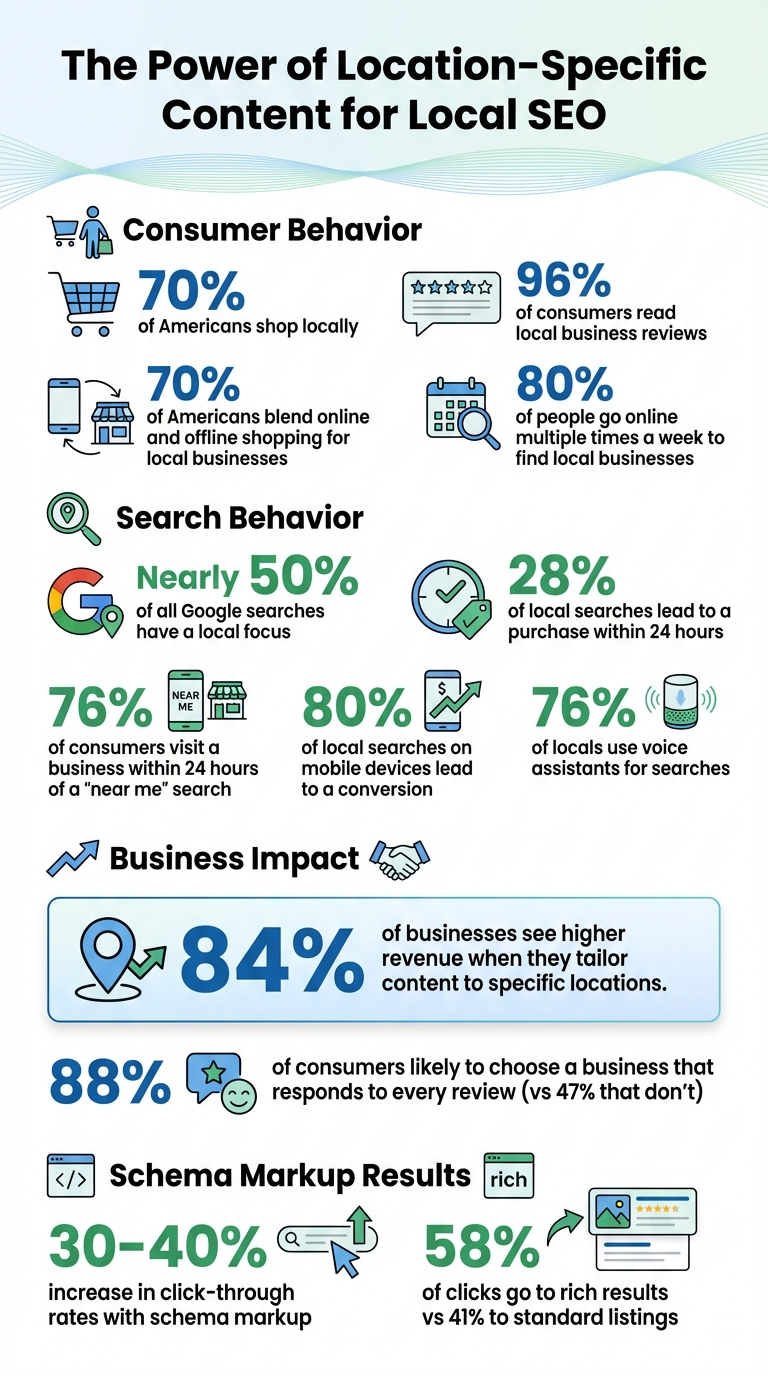
Local SEO Statistics and Impact on Business Revenue
To succeed in local SEO, you need to understand how people in your area search. Nearly half of all Google searches have a local focus, and 28% of those lead to a purchase within 24 hours. The trick is to pair your business’s main keywords with location-specific terms – like city names, neighborhoods, zip codes, or even landmarks. For example, "bakery near Ocean Drive" combines a service with a recognizable local feature.
Local searches typically fall into two categories: explicit and implicit. Explicit searches include the location directly, such as "dentist in Miami." On the other hand, implicit searches rely on Google’s ability to detect local intent based on the user’s location or search history – for example, typing "dry cleaners" without specifying a city. While implicit searches often have higher search volumes, both types are crucial because Google tailors results to the searcher’s location automatically.
Another important step is recognizing the language your audience uses. Pay attention to local slang or terms people might use when searching for services. A great way to find these is by reviewing competitor profiles on Google Business. Look for "Place Topics", which highlight commonly mentioned terms in customer reviews.
Don’t overlook low-volume keywords for smaller, hyper-local markets. Many keyword tools struggle to provide detailed data for these, but these searches still happen and can bring in highly targeted traffic. A great example is Kody Smith, who used smart local keyword strategies to turn his pet waste removal side job into a $300,000-a-year business – all without spending on ads.
Google Keyword Planner is one of the best tools for local keyword research. It allows you to narrow your focus to specific cities or zip codes, giving you localized search volume data. Use the "Get search volume and forecasts" feature to see how often terms like "boiler repair" are searched in your area.
SEMrush also offers excellent tools for local SEO. The "Keyword Magic Tool" lets you filter for keywords that trigger a "Local Pack" (those map results with three business listings), which typically indicate high-intent searches. Additionally, the "Keyword Gap" tool identifies terms your competitors rank for but you don’t, helping you find untapped opportunities.
For free insights, Google Autocomplete is invaluable. Start typing your keyword followed by "in [City]" or "near" to see real-time suggestions based on what people are searching. The "People Also Ask" section is another goldmine, highlighting common question-based searches like "What’s the best cleaning service in Dallas?".
Want deeper insights? Check out local Reddit threads, Quora discussions, or Facebook groups. These platforms often reveal the informal language and specific concerns of your target audience. You can also use tools like "Google Location Changer" to simulate searches from your target city, giving you a clearer picture of what locals see.
By using these tools and strategies, you can uncover keywords that align with the way people search in your area.
Search behavior isn’t one-size-fits-all – it varies by location. Matching your keywords to these patterns is key to attracting the right audience. For example, "wedding venue Boston" might indicate someone researching options, while "book wedding Hampshire House Boston" shows they’re ready to make a reservation.
To make sense of this, categorize your keywords by intent:
Understanding these distinctions is crucial since 80% of people go online multiple times a week to find local businesses, often at different stages of their decision-making process.
Voice search is another factor to consider. With 76% of locals using voice assistants, optimizing for natural, conversational phrases like "Where can I get my phone fixed?" is essential. These queries tend to mimic everyday speech more than traditional typed searches. As Darren Shaw, Founder of Whitespark, explains:
"While traditional Google searches usually consist of separate keyword queries, AI searches look like full-on back-and-forth conversations".
Physical proximity also plays a big role in local search results. The businesses shown in the Local Pack can change depending on where the searcher is standing. Try testing this by searching from different neighborhoods in your city – you’ll likely see different results each time. This makes it important to target not just city names but also specific neighborhoods, landmarks, and zip codes.
These insights into local search behavior will directly shape the strategies for creating location-specific content discussed in the following sections. By tailoring your approach to match how people search in your area, you’ll be better positioned to connect with your audience.
After pinpointing the right local keywords, the next step is crafting content that’s genuinely tailored to each location. Avoid using the same generic content across multiple pages – each location deserves its own unique touch. Emily Brady, Sr. SEO Manager at Podium, sums it up perfectly:
"The question isn’t, ‘How should I go about creating an awesome location page?’, but rather, ‘Am I giving customers enough unique value to even justify this page in the first place?’"
To stand out, Google rewards pages that highlight local expertise. Think team photos, real storefront images, and branch-specific reviews. With 96% of consumers reading local business reviews and 70% of Americans blending online and offline shopping for local businesses, having location-specific content is key to influencing customer decisions. Let’s dive into what makes a strong location page.
Once your keyword research is complete, every location page should include details that resonate with local customers. Start with the basics: your NAP data – Name, Address, and Phone number. Make sure this information is in crawlable HTML text, not embedded in an image. Use LocalBusiness Schema to make it easier for search engines to interpret .
Beyond the essentials, add business hours (don’t forget seasonal or holiday adjustments) and directions with nearby landmarks. Instead of just listing an address, provide context like, "We’re five minutes from City Hall, right across from the red church on Main Street."
Adding a personal touch can make a big difference. Include staff bios and photos for each branch. For example, Swish Dental’s Bee Cave, Texas location does a great job of showcasing its dentists and staff, along with parking details and localized patient reviews. Feature branch-specific reviews and complement them with original photos of the storefront (interior and exterior), parking area, and team. A local FAQ section is also a great addition – answer questions like, "Is there public transit nearby?" and provide specifics such as the closest bus stop .
You can also highlight unique aspects of each branch, like participation in local initiatives or community projects. For instance, a location’s green energy practices can set it apart.
Once you’ve created unique content, it’s important to avoid duplicate content issues. Simply swapping out city names in the H1 and meta titles won’t cut it. These “thin” pages often lack value and could be flagged as doorway pages, violating Google’s guidelines .
Location pages often include a mix of boilerplate service descriptions and unique local content. The key is to make the local details the highlight of each page. Incorporate geo-specific information, such as local laws, weather-related challenges (like managing humidity in coastal areas), or community involvement . For example, Molly Maid’s Santa Clara, California page avoids duplication by using local keywords like "Santa Clara house cleaning" and embedding a Google Map to show their exact service area.
If you’re managing a large number of locations, dynamic templates can help streamline the process. However, allow local managers to add their own updates to keep the content authentic. Amanda Jordan from RicketyRoo offers a great perspective:
"Local businesses should focus on branding, customer experience, and developing their expertise. With generative AI coming into play, having lots of content about your topic isn’t enough."
The bottom line? Every location page should offer content that’s truly distinct and impossible to replicate elsewhere.
Fine-tuning your on-page elements is essential for helping search engines pinpoint your service areas. By strategically placing location-based keywords in your metadata and using structured data, you make your business details clear and accessible. This matters because 80% of local searches on mobile devices lead to a conversion, and 76% of consumers visit a business within 24 hours of a "near me" search. These small but crucial adjustments can significantly boost foot traffic and phone inquiries, especially when paired with dedicated local landing pages.
Incorporating your city or neighborhood name into metadata is a simple yet powerful way to signal your location to search engines. For title tags, include the location name early on, as Google truncates titles after 60 characters. A tried-and-true format is: Primary Keyword + Location + Brand Name. For example, "Emergency Plumber | Manchester | ABC Plumbing" makes your service and location clear to both users and search engines.
Meta descriptions should also highlight your service, location, a unique selling point, and a call-to-action – all within 155 characters. For instance: "Family-owned bakery in Brooklyn serving fresh sourdough since 2010. Visit us today!" This concise description not only informs but also entices searchers to click. Similarly, your H1 header should include your service and city name, such as "Plumbing Services in Austin." Google Search Central emphasizes that including the business’s physical location in titles helps improve clarity and relevance.
Additionally, clean URL paths (e.g., /locations/chicago/) and location keywords in image alt text can enhance your visibility in visual searches.
While metadata helps establish your local keyword focus, schema markup takes it a step further by directly communicating your business details to search engines. This structured data allows search engines to present enhanced results, such as star ratings, business hours, and even images, which can boost click-through rates by 30% to 40%. Rich results consistently outperform standard listings, capturing 58% of user clicks compared to 41%. This means more visibility, more clicks, and ultimately, more customers.
To implement schema markup effectively:
Dentist or Bakery instead of the generic LocalBusiness provides more precise context.<head> section of your site."Schema Markup is a standardized vocabulary developed by Google, Yandex, Yahoo, and Bing. As such, these search engines can easily interpret the Structured Data on your page, allowing the algorithms to present users with content that better aligns with their search intent."
_ – Martha van Berkel, CEO and Co-founder of Schema App_.
The impact of schema markup is undeniable. For example, Rakuten saw 2.7x more traffic on their recipe pages and a 1.5x increase in session durations after adopting Recipe schema in 2014. Similarly, Jobrapido experienced a 182% jump in organic traffic and a 395% increase in new user registrations after implementing JobPosting schema in 2017.
Consistency is key. Your NAP (Name, Address, Phone number) information in schema markup must match your Google Business Profile and other directories precisely, including details like "Suite" vs. "#". Be sure to update schema whenever business hours or other details change, such as during holidays. Avoid overusing schema by applying it only to pages with relevant content.
| Element | Best Practice | Recommended Length/Format |
|---|---|---|
| Title Tag | Primary Keyword + Location + Brand | Less than 60 characters |
| Meta Description | Service + Location + USP + CTA | Less than 155 characters |
| H1 Header | Include Service and City Name | One H1 per page |
| Schema | Use JSON-LD for LocalBusiness |
Include geo-coordinates & hours |
Visuals and testimonials do more than just grab attention – they help establish trust and strengthen your local SEO strategy. Your location pages need to convince potential customers with credible and relatable content.
Include real photos of your storefront, interior, and staff to build trust. Avoid using generic stock images – these can leave customers feeling let down or confused when they visit and see something different. Emily Brady, Sr. SEO Manager at Podium, emphasizes this point:
"Customers are more likely to be disappointed, confused, or frustrated when the photos don’t match reality".
Start with clear exterior shots that feature your signage to make it easy for visitors to find you. Add interior photos that showcase your space, highlight your inventory, and include candid images of your team. These authentic visuals not only improve the user experience but also enhance your search visibility. As David Mihm, Co-Founder of Near Media, puts it:
"Despite all the hype around Gen Z and TikTok, photos remain the most compelling medium for the widest swath of potential customers".
To make your images work harder for your SEO, optimize the alt text with location-specific keywords. For example, instead of a generic description like "office waiting room", use something more specific, such as "dental office waiting room in Bee Cave, Texas." This boosts both accessibility and search rankings. But visuals alone aren’t enough – customer reviews are equally powerful.
Highlight reviews from customers who visited a particular location rather than showing a generic feed of company-wide testimonials. Why? Because localized reviews resonate more with potential customers. Research shows that 88% of consumers are likely to choose a business that responds to every review, compared to only 47% who would pick one that doesn’t engage at all.
Make these reviews stand out by using widgets or carousels on your site. Encourage timely feedback by requesting reviews via email or SMS shortly after a visit. You can also use QR codes on receipts or in-store signage to guide customers directly to your review page. When responding to reviews, do so within 24 hours, addressing the customer by name and referencing their specific feedback. This personalized approach shows that you value their input.
Internal links play a crucial role in distributing authority across your site, guiding search engine crawlers, and helping users navigate effectively. Without a proper linking strategy, your location pages can end up isolated, making them harder for both Google and potential customers to find. John Mueller, Google’s Search Advocate, highlights this importance:
"It’s one of the biggest things that you can do on a website to kind of guide Google and guide visitors to the pages that you think are important".
The objective is to create a network where every location page is easily accessible and logically connected to related content. A well-executed internal linking strategy simplifies your site’s structure, ensuring that any location page is reachable within just three clicks.
Internal linking doesn’t stop at site navigation – it extends into your blog content, creating a unified web of localized information. When writing about topics like local events, community initiatives, or service advice, include links to the relevant location pages. For instance, a blog post about sponsoring a charity run in Austin should link to your Austin location page with descriptive anchor text like "plumbing services in Austin" instead of vague terms.
These contextual links not only help readers but also signal semantic connections to search engines, enhancing your site’s relevance and engagement metrics. Similarly, linking your service-specific pages to the corresponding location pages strengthens the internal network and makes navigation more intuitive.
As your collection of location pages expands, having a scalable linking strategy becomes critical. Start by organizing your URLs with subfolders (e.g., example.com/locations/city-name) rather than subdomains. Subfolders inherit more domain authority and are easier to manage. For smaller networks, direct links from the main menu work well. For larger networks, consider implementing a "Store Locator" or an alphabetical directory.
Another effective tactic is adding a "Nearby Locations" module to each location page. This feature helps users discover nearby branches and strengthens the overall internal linking structure. Regular site audits using tools like Semrush or Screaming Frog can help you identify orphan pages – location pages with no incoming internal links – and fix them. Additionally, if you use a store locator widget, create a static HTML sitemap that links to all location pages. This ensures search engines can crawl and index them efficiently.
Creating location-specific content is a powerful way to connect with customers right when they need your services the most. By combining local keyword research, tailored content, optimized on-page elements, genuine reviews, and strategic linking, you can build a trusted network that appeals to both search engines and customers. The results speak for themselves: 84% of businesses have reported a positive impact on revenue after localizing their marketing content.
However, avoid taking shortcuts like swapping out city names in generic templates. These approaches fail to engage customers and fall short of search algorithm standards. Instead, focus on providing real value. Think staff bios for each branch, detailed directions from nearby landmarks, neighborhood-specific FAQs, and authentic photos of your storefront. Amanda Jordan from RicketyRoo emphasizes this point:
"Local businesses should focus on branding, customer experience, and developing their expertise. With generative AI coming into play, having lots of content about your topic isn’t enough".
This kind of effort pays off. Local searchers often have immediate intent, making them much more likely to convert into paying customers than those arriving through generic searches. With 70% of Americans now blending online and offline transactions when shopping locally, investing in location-specific content can help you capture this high-value traffic across multiple markets.
To implement these strategies effectively, rely on proven techniques. Conduct hyperlocal keyword research, use LocalBusiness Schema markup, and ensure NAP (Name, Address, Phone number) consistency across directories. Each step builds toward a comprehensive, user-focused SEO strategy. These tactics, paired with professional local SEO services – such as those offered by Blue Aspen Marketing – including Google Business Profile optimization, localized content creation, and citation management, can help businesses dominate local search results.
To give your local SEO a boost, start by pinpointing keywords that combine your services or products with location-specific terms, such as your city, neighborhood, or phrases like "near me." For example, if you run a bakery in Austin, keywords like "organic bakery Austin TX" or "best cupcakes near me" can help attract the right audience.
Once you’ve identified these keywords, create specific pages or blog posts that target them. For example, you could craft a page titled "Top Plumbing Services in Seattle" or write a blog post addressing questions like "How to Choose a Pet-Friendly Hotel in Dallas." Be sure to use the keywords naturally throughout the page title, meta description, URL, and content to maintain readability while improving search rankings.
Finally, keep an eye on how your keywords are performing. Use tools to track your rankings and make adjustments as needed. Also, ensure your business’s name, address, and phone number (NAP) are consistent across your website and all other platforms. If you’re looking for professional help, Blue Aspen Marketing specializes in creating location-focused content to enhance your local SEO and deliver measurable results.
To craft content that resonates with local audiences and boosts SEO, start by pinpointing the search terms your potential customers are using. Look for keywords that combine your services with location-specific details, such as city names, neighborhoods, or phrases like "near me." Then, shape your content to reflect the distinct characteristics of each area, incorporating mentions of local landmarks, community happenings, or even customer reviews.
Make sure every location page is unique. Include essential details like your business address, phone number, and operating hours formatted for U.S. audiences (e.g., Mon–Fri 9 a.m.–5 p.m.). Add a personal touch with locally relevant visuals, such as photos of your storefront or team. To help search engines better understand your business, use structured data and embed a Google Map for easy navigation.
If you’re looking for expert guidance, companies like Blue Aspen Marketing specialize in crafting tailored strategies to help businesses succeed with local SEO.
Using LocalBusiness Schema markup is a smart way to help search engines grasp the essential details about your business, like your address, phone number, and the services you offer. This added clarity can result in improved local search results, such as rich snippets or knowledge panels, making your business more noticeable and appealing to potential customers.
Adding structured data not only enhances your visibility but can also drive more clicks and improve your chances of showing up in relevant local searches. It’s a straightforward yet impactful method to boost your local SEO efforts and connect with nearby customers more effectively.


 Physical Therapy
 MedSpa
 Dental
 HVAC
HVAC Roofing
 Pest Control
 Cleaning Services
 Landscaping
 Hotel
Hotel Cruise
 Branding
 Content Marketing
 Email Marketing
 Graphic Design
 PPC (Online Ads)
 SEO (Search Engine Optimization)
 Website Design and Development
 Pest Control
 Plastic Surgeon
 Roofing