If your rankings drop, the cause is usually one of six things: a Google update, a SERP layout change, a technical error, old content, lost links, or local SEO issues.
Before I change anything, I’d check Google Search Console and GA4 first. If clicks and impressions both fall, rankings may be slipping. If impressions stay flat but clicks fall, the issue is often CTR. And if GA4 drops but Search Console does not, I’d check tracking before touching the site.
Here’s the short version:
A few numbers help set expectations:
The main point: I’d confirm the drop, match the pattern to the cause, and fix the highest-impact problem first instead of changing everything at once.
Google updates can knock down rankings even when your site hasn’t changed at all. If you didn’t touch the site, the next thing to ask is simple: did Google change what it rewards?
Google rolls out major updates that reshuffle rankings. Recent core and spam updates led to ranking swings across many sites, and hit sites often saw sharp traffic drops. These updates have hit unreviewed AI content and thin pages especially hard, while sites publishing original, expert-authored content picked up more visibility during the same stretch.
The fastest clue is timing. Check Google’s status dashboard and line up the drop with rollout dates. If the decline starts around the same time, an algorithm change is a strong suspect. You should also check the Manual Actions tab in Search Console. One short look can tell you whether the problem is a manual penalty or an algorithmic drop.
Sometimes rankings stay put, but the search results page changes enough to cut traffic anyway. Google may start favoring SERP features like map packs, videos, and AI Overviews for a keyword that used to show mostly text results. AI Overviews and other SERP features can reduce clicks even when rankings stay stable.
Search your top keywords in an incognito browser and review page one. If a SERP feature now takes up space that a standard text result used to get, that alone can explain the traffic drop. In Search Console, flat impressions with fewer clicks often point to a SERP shift.
If updates and SERP changes don’t explain the decline, the next place to look is technical issues.
If the drop doesn’t match a Google update or a SERP shift, look at technical issues next. This is where things get sneaky. A site can look normal on the surface while Google struggles to crawl, render, or index the pages that matter most.
Site changes can also cause trouble without setting off alarms right away. A redesign, plugin update, or hosting switch might seem harmless at first, then rankings slide a few weeks later.
Page speed and mobile usability affect rankings. Core Web Vitals targets are LCP under 2.5 seconds, INP under 200 ms, and CLS under 0.1. When pages are slow or jump around as they load, pages sitting on the edge of page one can slip.
Common causes include:
After a site change, check Core Web Vitals in Search Console. Then use PageSpeed Insights and Mobile Usability to spot the issue. If Mobile Usability shows errors, handle those first.
If Google can’t crawl or index a page, it can’t rank that page. Simple as that.
Common blockers include noindex tags left on after a staging-to-live move, robots.txt rules that block key directories like /services/ or /blog/, and missing 301 redirects after a URL change.
Start with site:yourdomain.com, then go to Search Console > Indexing > Pages. Look for noindex tags, robots.txt blocks, redirect gaps, and missing pages. It also helps to compare your sitemap URLs against indexed pages. If that gap keeps getting bigger, Google is skipping pages you want indexed.
If you think rendering is the problem, use the URL Inspection live test to compare the rendered page with the source HTML. If headings or body text are missing in the rendered version, Google may not be seeing key content at all.
After a hosting change, check the Crawl Stats report in Search Console for spikes in response time or 5xx errors. Those are often signs of crawl health problems.
The order of fixes matters:
Technical fixes can take a little patience. Removing a noindex tag, for example, can start to show results in 7 to 21 days once Google recrawls the affected pages.
Bring in technical SEO help when a migration, rendering issue, or indexing regression hits many pages and you can’t pin down the cause fast.
If technical checks don’t explain the drop, the next place to look is content quality, backlink loss, and local SEO signals.
If Google updates and technical checks don’t explain the drop, look at these next. At this point, you’re dealing with site-side issues that often fly under the radar.
Pages can slip when they get old. If a page sits untouched for 6 to 12 months, it often starts losing ground to pages that are newer and more complete.
Google Search Console can help you spot this early. Watch impressions closely. If impressions keep falling over a 90-day stretch, Google is showing your page less often. That’s a strong sign the page is decaying. In early 2026, pages that weren’t updated within a 90-day window saw traffic drops of 20% to 40% in tracked accounts.
Intent mismatch is a different issue, but it often shows up at the same time. If a page still gets impressions but has a low CTR or a high bounce rate, the page may not line up with what people want.
A simple check helps here: compare your page with the current top results. If those pages answer the query faster, go deeper on the topic, or cover subtopics you missed, your page likely needs a rewrite to better match intent.
If the content still looks current, the next place to look is authority.
Backlinks don’t last forever. Sites shut down, pages disappear, and old partnerships fade out. On average, sites naturally lose 5% to 8% of their backlinks each year.
The tricky part is timing. Ranking drops from lost backlinks usually show up 2 to 6 weeks after the link disappears, because Google needs time to recalculate authority signals. So if rankings start drifting and you didn’t change the site, backlink loss is one of the first things to check.
Use the Top Linking Sites report in Google Search Console, then match any lost domains to the timing of the drop. If the decline is hitting a few high-traffic pages instead of the whole site, lost links pointing to those URLs are even more likely.
If you lost a high-value link because you changed a URL on your side, a 301 redirect from the old URL to the new one can help keep that authority flowing.
For local companies, ranking loss often shows up in map results and directory signals too.
If your business name, address, and phone number don’t match across your site, Google Business Profile, and local directories, trust can weaken. And when trust weakens, rankings can slide. A weak Google Business Profile can make the problem worse.
Local rankings also shift even when your own site stays the same. That’s because local SEO is relative. If nearby competitors improve faster, they can move ahead of you even if you haven’t done anything wrong.
Rankings can also drop when your own site hasn’t changed.
That kind of pattern helps narrow the issue. If the drop is local, the next fix is often in your business data, local presence, or competitor gap – not just on-page content.
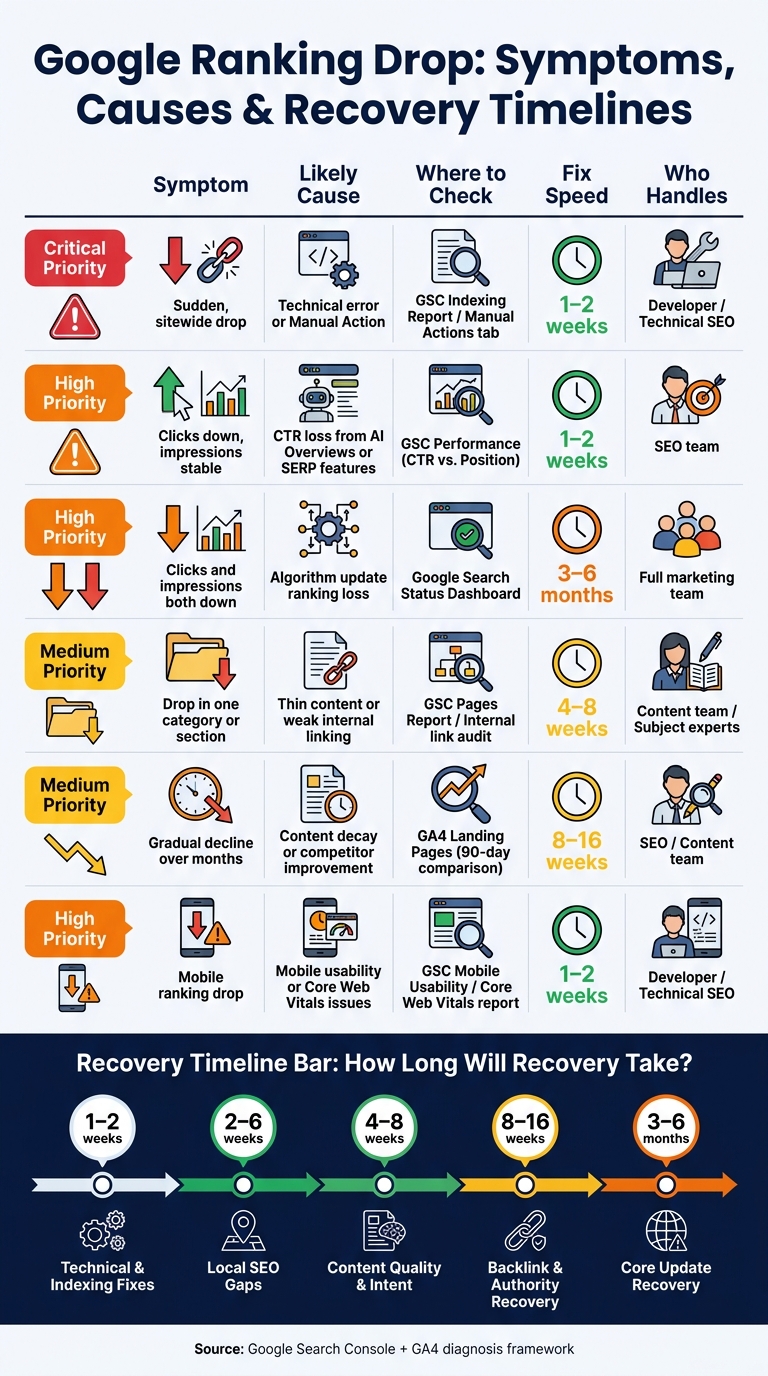
Google Ranking Drop: Symptoms, Causes & Recovery Timelines
Start by confirming the drop in Google Search Console and GA4. Before you touch anything, rule out tracking problems or normal seasonal swings. That step matters. A ranking drop that looks scary at first can sometimes come from bad tracking, a reporting change, or a dip you see every year.
Then look at the pattern of the drop. That tells you more than the drop alone.
A sudden, sitewide loss usually points to a technical problem, a manual action, or a big algorithm shift. A slow slide over a few months often means content decay or a competitor moving past you. If the drop hits just one page, or a small set of pages, the cause is often more specific: lost backlinks, a page-level technical problem, or a competitor making that exact page better.
Use the pattern below to decide where to look first:
| Symptom | Likely Cause | Where to Check | Priority |
|---|---|---|---|
| Sudden, sitewide drop | Technical error or Manual Action | GSC Indexing Report / Manual Actions tab | Critical |
| Clicks down, impressions stable | CTR loss from AI Overviews or SERP features | GSC Performance (CTR vs. Position) | High |
| Clicks and impressions both down | Ranking loss from an algorithm update | Google Search Status Dashboard | High |
| Drop in one category or section | Thin content coverage or weak internal linking | GSC Pages Report / Internal link audit | Medium |
| Gradual decline over months | Content decay or competitor improvement | GA4 Landing Pages (90-day comparison) | Medium |
| Mobile ranking drop | Mobile usability or Core Web Vitals | GSC Mobile Usability / Core Web Vitals report | High |
There’s a simple order that tends to make sense: fix technical and indexing problems first, then move to content and search intent, then local SEO, backlinks, and broader recovery work.
Why that order? Because technical and indexing issues can block pages from showing up at all. If Google can’t crawl, index, or serve the page right, content edits won’t help much.
Technical and indexing fixes often show movement in 1 to 2 weeks. Content quality and intent work usually takes 4 to 8 weeks. Local SEO gaps often need 2 to 6 weeks. Backlink and authority recovery is slower, often 8 to 16 weeks, and recovery after a core update may take 3 to 6 months.
| Issue Type | Ranking Impact | Fix Speed | Who Usually Handles It |
|---|---|---|---|
| Pages deindexed or blocked by robots.txt | Catastrophic | Fast (1–2 weeks) | Developer / Technical SEO |
| Broken redirects (404s) | High | Fast (1–2 weeks) | Developer / SEO |
| Content quality / E-E-A-T | High | Slow (4–8 weeks) | Content team / Subject experts |
| Local SEO gaps | High (local only) | Moderate (2–6 weeks) | SEO / Google Business Profile manager |
| Lost backlinks | Medium | Very slow (8–16 weeks) | SEO / PR team |
| Core update recovery | High | Long (3–6 months) | Full marketing team |
One note here: don’t change five things at once. It’s tempting, especially when traffic is down. But if you roll out a pile of fixes in one shot, you won’t know what helped. Make the smallest meaningful fix first, then watch the data for a few weeks before moving to the next issue.
Once you know the likely cause, fix the highest-risk issue first and watch the result before making more changes.
Ranking drops usually come from algorithm updates, technical problems, stale content, lost links, weak local signals, or competitors moving faster. The right next step is to confirm the drop is real in Search Console and GA4, then match the timing and pattern to the most likely cause before you make any changes. Fix the wrong thing first, and you can waste weeks while making the problem harder to diagnose.
If your business needs a structured recovery plan instead of guesswork, Blue Aspen Marketing can help you work through the diagnosis and prioritize the fixes most likely to improve results.
Don’t rely only on third-party rank trackers. Use Google Search Console as your main source of truth.
Check the Performance report for the last 90 days. If impressions stay steady but clicks fall, that usually points to a CTR issue, not a ranking drop.
If both impressions and clicks go down, look at the pattern more closely. Is the drop happening across the whole site? Is it tied to certain categories? Or is it limited to a few pages?
It also helps to line up the date of the drop with major Google updates. That can tell you whether the change came from your site or from a shift in search results.
Yes. Rankings can drop even if you haven’t changed your website, because search results are relative.
Your site can slip if competitors improve at a faster pace, Google changes how it ranks pages or reads search intent, or shifts in search behavior, seasonality, and outside technical problems hurt visibility.
First, confirm that the drop is actually happening. Check Google Search Console and Google Analytics side by side instead of leaning on rank trackers alone. Those tools can miss the full picture.
Also, hold off on making fast site changes. If you start guessing, you can make a bad situation worse.
Then study the pattern of the drop.
A sudden, sharp decline usually points to a technical problem. Common causes include indexing errors, robots.txt blocks, accidental noindex tags, or broken redirects.
A slower decline usually points somewhere else. In most cases, that means an algorithm update or a content quality issue.


 Physical Therapy
 MedSpa
 Dental
 HVAC
HVAC Roofing
 Pest Control
 Cleaning Services
 Landscaping
 Hotel
Hotel Cruise
 Branding
 Content Marketing
 Email Marketing
 Graphic Design
 PPC (Online Ads)
 SEO (Search Engine Optimization)
 Website Design and Development
 Pest Control
 Plastic Surgeon
 Roofing