Most landing pages will never get cited by ChatGPT. The fix is simple: I make the page easy to read in plain HTML, put the main offer near the top, answer buyer questions in short blocks, and add markup and proof that AI tools can check.
Here’s the short version:
A few numbers stand out: only 0.7% of indexed pages are cited by ChatGPT, and AI systems often pull the first clear answer in a section. So if I want my page to show up, I need to make the answer plain, short, and easy to find.
If I had to boil it down to one idea, it’s this: clear copy beats clever copy when I want AI tools to understand and cite a landing page.
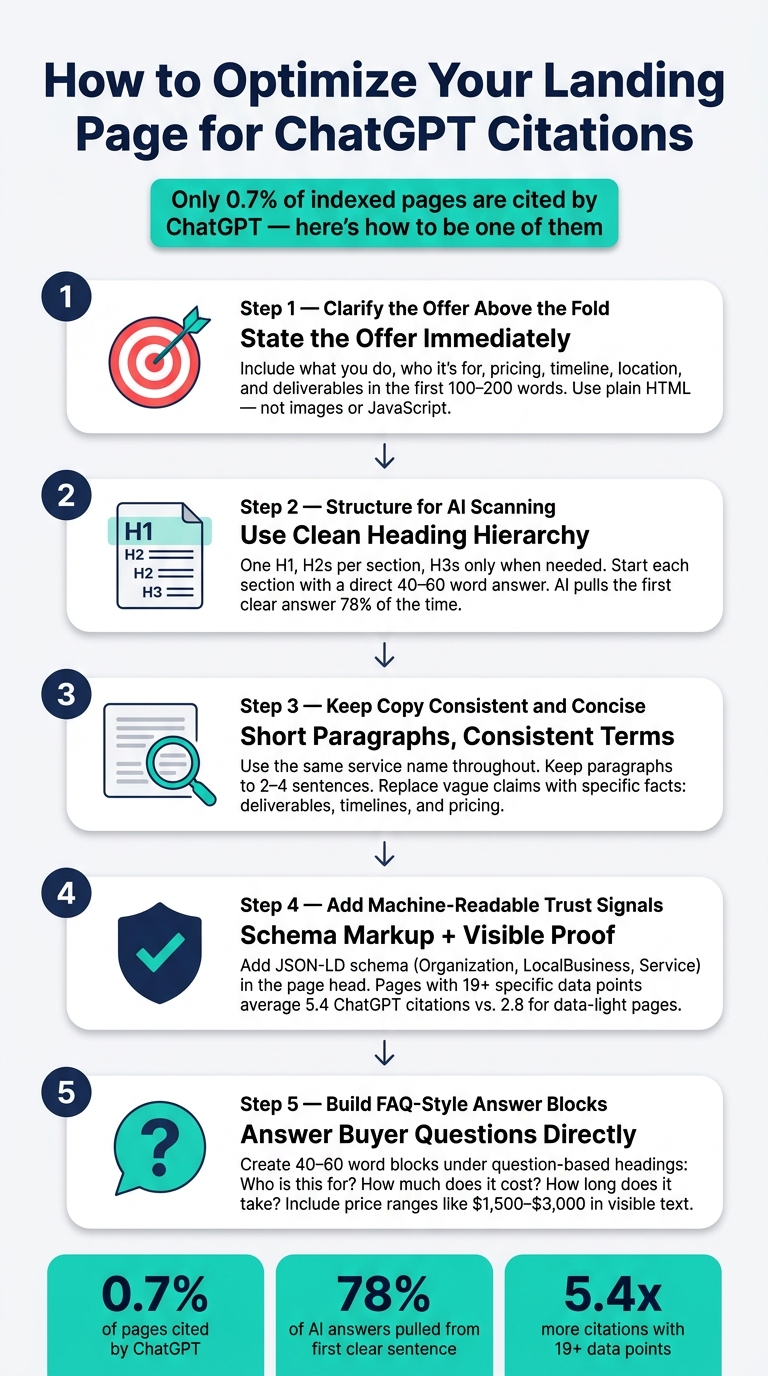
How to Optimize Your Landing Page for ChatGPT Citations
Say what you do right away. In the first 100–200 words, spell out the business, service, audience, and outcome. When a page leads with a clear value proposition, it’s more likely to be described the right way than a page that opens with vague or abstract copy.
Your H1 should state what you do, who it’s for, and the result. Keep the wording plain and specific so AI tools can sort and label the page correctly.
Then add a hero line that names the product, its function, and the outcome in a single sentence.
Under that, include two or three short sentences that answer who this is for and what they can expect. If you can, make the first sentence a straight answer. AI engines often pull the first clear answer they find in a section.
Place the main facts near the top of the page in plain HTML. That includes pricing, timeline, audience, location, and deliverables. Don’t bury this stuff inside hero images or client-side scripts. AI crawlers read HTML, and many of them don’t run JavaScript.
A simple way to think about it:
Once the offer is clear at the top, the rest of the page becomes much easier for AI to summarize correctly.
Once the offer is clear at the top, the rest of the page needs a clean layout too. AI tools like ChatGPT read pages in chunks, not as one smooth piece of prose. If sections blur together, summaries can drift off course. A clear structure helps ChatGPT pull the right answer from the right section.
Stick to one H1, use H2s for main sections, and add H3s only when you need them. Then start each section with a direct answer in 40–60 words, not a warm-up line or scene-setting intro. AI engines pull the first clear answer in a section 78% of the time, so a fuzzy opening can lead them to grab a weaker line farther down.
Each opening paragraph should work on its own. Write it like a complete answer, and skip references to other parts of the page like “as we mentioned above.”
After the page hierarchy is in place, split your content into clear blocks. Don’t cram service scope, fit, and outcomes into the same section. Give each one its own space, or use a comparison table so the differences stay plain. Tables in well-structured HTML are easier for AI to parse with more confidence.
That also helps AI connect your service to what a buyer wants. Say someone asks ChatGPT for a marketing agency that works with small businesses on a short timeline. If your page separates those details cleanly, the match is much easier to make.
Use the same name for each service across the whole page. If the headline says “Local SEO” but the body or footer uses another label, AI tools may read them as separate services or get less sure about what you offer.
Keep paragraphs short – two to four sentences is the target range. Swap vague claims for specific, supportable details like deliverables, timelines, or pricing. Concrete facts give AI something it can cite and repeat with less guesswork.
After the structure is clean, add trust signals and schema so AI can verify what the page says.
Once your page is easy to scan, add trust signals AI can check against. These signals help AI confirm your business name, what you do, and who you serve.
Use JSON-LD schema to spell out your business details in a machine-readable format. Put the <script type="application/ld+json"> block in your page’s <head> section. On your homepage, use Organization or LocalBusiness schema to define your business name, address, phone number, and service area. On service pages, add Service schema to describe what you offer, pricing, and availability.
Use the sameAs property in Organization schema to connect your site to LinkedIn and other trusted profiles that match your business.
"Structured data is a direct input into AI Overview generation." – Sam Goto, Google Search Central Live Madrid
Make sure every detail in your schema matches what people can see on the page. If your schema says one thing and your page copy says another, AI tools have less reason to trust it.
Then give those facts some backup AI can cite.
Vague claims don’t give AI much to work with. Specific proof does. A testimonial like "We saw a 36% increase in sales" – with a full name, title, and company attached – is much easier for AI to use on your landing page. For case study summaries, put the number at the top. Pages with 19 or more specific data points average 5.4 ChatGPT citations, compared to 2.8 for pages with less data.
| Trust Signal Type | Best Format | What It Helps Prove |
|---|---|---|
| Testimonial | Full name, title, company, and specific outcome | Customer satisfaction and measurable results |
| Case study result | Quantitative summary at the top | Measurable outcomes |
| Schema markup | JSON-LD in Organization, LocalBusiness, or Service schema |
Business identity and service details |
| Reviews, press, or directory links | Links to reviews, press, or directories | External credibility signals |
| Consistent contact details | Matching name, address, and phone across the site and directories | Verified business and service area |
One more thing: make sure these trust signals appear in the visible HTML, not only after JavaScript loads.
With those signals in place, the next move is to build short answer blocks around common buyer questions.
Once your page structure is set, add short answer blocks for the questions buyers ask most.
Write each answer as a 40–60 word paragraph. Start with the direct answer, then add one or two details that back it up. Put the block right under a question-based heading like "Who is this service for?" or "How much does it cost?" Each page should give one clean answer per question.
Each block should include one direct answer, one supporting detail, and one proof point. Name the service, name the audience, explain the problem it solves, and add concrete details like a $1,500–$3,000 price range, monthly billing, a two-week timeline, or listed deliverables. Stick to facts. If pricing sits behind a contact form, AI tools may pull wrong numbers from other sources instead.
Use the same answer-block format on every service page so ChatGPT can compare offers cleanly. Then swap in the terms that fit that service.
For SEO, mention rankings, traffic, and backlinks. For PPC, mention Google Ads, Meta Ads, ROAS, and CPA. For website design, mention speed, accessibility, and mobile performance. For content marketing services, mention case studies, whitepapers, and expertise. For email, mention segmentation, open rates, and abandoned-cart recovery.
| Buyer Question | Landing Page Section Heading | Include |
|---|---|---|
| Who is this service for? | Who This Service Is Best For | Audience, stage, fit |
| How much does it cost? | Pricing and Scope | USD range, billing frequency, inclusions |
| How long does it take? | Timeline and Deliverables | Timeline, milestones, deliverables |
| What proof exists? | Results and Proof | Case studies, testimonials, metrics |
Keep each block self-contained. Skip references like "as mentioned above" so AI systems can pull the answer cleanly.
Only 0.7% of indexed pages are cited by ChatGPT right now. That means most small business pages still aren’t showing up through AI-driven discovery. Start with one page, tighten the answer blocks, and then repeat the same pattern across the rest of your service pages.
Check your page’s raw HTML with a view source test. Then search for your main headlines and value props.
If they’re missing, your site may depend on client-side JavaScript that AI crawlers can’t run.
You can also turn off JavaScript and refresh the page. If the content vanishes, it’s probably invisible to AI.
Finally, use Google’s Rich Results Test to make sure your structured data is valid.
Use JSON-LD structured data inside a <script> tag. For service pages, focus on Organization, Product, and FAQPage schema.
Here’s the simple version:
Keep your schema in line with the text on the page. Don’t cram in a bunch of schema types just because you can. And always test it with Google’s Rich Results Test.
Keep pricing, reviews, and results current at all times. AI tools pull from both periodic model updates and live retrieval, so old page details can throw off accuracy.
Think of your landing page as living content. Review it on a regular basis so the information stays accurate and in step with how AI search keeps changing.


 Physical Therapy
 MedSpa
 Dental
 HVAC
HVAC Roofing
 Pest Control
 Cleaning Services
 Landscaping
 Hotel
Hotel Cruise
 Branding
 Content Marketing
 Email Marketing
 Graphic Design
 PPC (Online Ads)
 SEO (Search Engine Optimization)
 Website Design and Development
 Pest Control
 Plastic Surgeon
 Roofing