If I want more calls from Google Maps, I need to do five things well: finish my Google Business Profile, get steady reviews, keep my business info the same everywhere, build local links, and keep my profile active.
That’s the short answer.
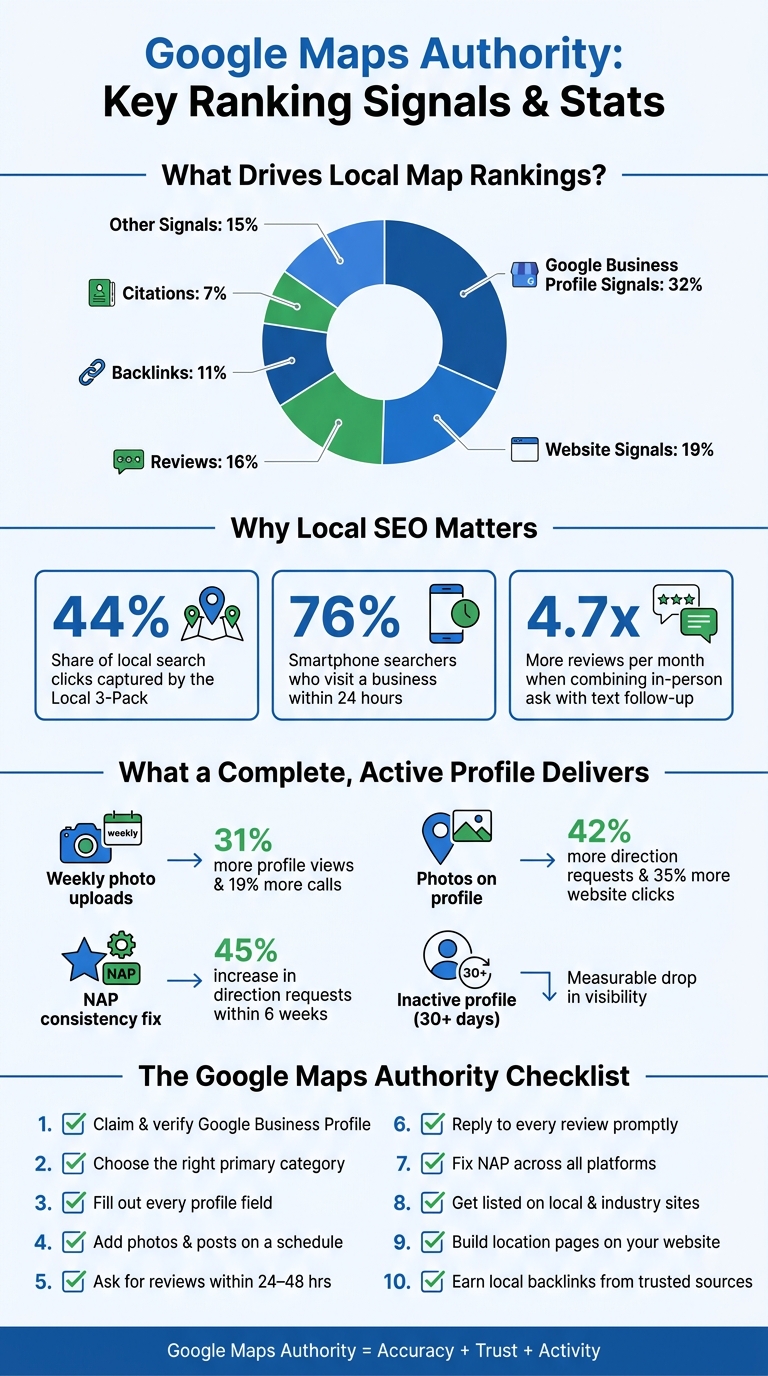
The article shows that Google Business Profile signals drive about 32% of local ranking impact, while reviews account for 16%, website signals 19%, backlinks 11%, and citations 7%. It also points out why this matters: the Local 3-Pack gets 44% of local search clicks, and 76% of people who search on a smartphone visit a business within 24 hours.
If I were boiling the whole piece down into a short checklist, it would be this:
Here’s the simple point: Google Maps authority comes from accuracy, trust, and activity. If my profile is complete, my reviews are recent, my contact details match everywhere, and my website backs it all up, I give Google more reasons to show my business in Maps.
That’s what the rest of the article explains in more detail.
Google Maps Local SEO: Key Ranking Signals & Stats
Your Google Business Profile tells Google what you do, where you serve customers, and why your business should show up higher in Maps. Start here because GBP sends some of the strongest relevance and trust signals in local search. Each field gives Google more reason to trust your business for nearby searches.
Start at business.google.com. If your business is already listed but unclaimed, claim it. If it isn’t listed yet, create it. In 2026, Google has leaned hard into video verification to confirm your physical location, though postcard, phone, and email methods may still show up depending on your business type.
After verification, fill out every core field: business name, website URL, physical address or service area, local phone number, and hours. If you run a service business without a storefront, you can set up to 20 service areas by city, ZIP code, or region. Also update holiday hours before major dates.
Your business name should match your real-world name exactly and stay in line with your website and invoices. Don’t tack on extra keywords or city names. That can break Google’s guidelines and put you at risk of suspension.
Fill out the services and products sections too. Adding individual services with short descriptions helps Google connect your profile to more specific searches.
Your primary category is the most important relevance choice on the profile. It tells Google what kind of business you are and which searches you may appear for.
A simple way to choose it is to search your main service keyword in Google Maps and look at the primary category used by the top three ranking businesses. If that category fits your main service, use it. Then add secondary categories for other services you actually offer, up to nine total categories.
For your business description, use the full 750-character limit. Start with your main service and location, then add details like years in business, certifications, or a specialty. Keep the writing natural and skip keyword stuffing.
Freshness matters. Profiles that sit inactive for more than 30 days often lose visibility. Businesses that upload new photos each week – actual storefronts, crews, vehicles, or job sites – get 31% more profile views and 19% more calls than businesses that update less often.
A good starting point is:
Before you upload, make sure the original files still have GPS coordinates in the EXIF data. That can support geographic relevance.
For Google Posts, publish an update every 7 to 14 days. Use posts for seasonal offers or service updates that give nearby customers a reason to act.
Once the profile is active and complete, reviews and citations can add more authority.
Once your profile is complete, reviews become the trust signal that turns visibility into calls. They do double duty: they can help your business show up higher in Maps, and they can push nearby customers to pick you instead of the business down the street. So the next move is simple: make it easy for people to leave that proof.
Timing matters more than most businesses think. Send your review request within 24–48 hours after a service is done, an appointment wraps up, or a support issue gets fixed. Businesses that pair a face-to-face ask with a text follow-up get an average of 4.7x more reviews per month than businesses that wait and hope customers leave feedback on their own.
Use the direct short link from your Google Business Profile dashboard (g.page/r/[ID]/review) so customers land on the review form right away, with no extra clicks. You can also turn that link into a QR code and place it on receipts, front desks, or leave-behind cards. The less friction, the better.
When you ask, encourage customers to mention the service they got, like "water heater installation" or "balayage." That extra detail can help Google connect your profile to more specific searches.
What to avoid: Google does not allow review gating, incentives like discounts or gifts, or fake reviews. Its systems can spot patterns like only asking happy customers, and breaking the rules can lead to all reviews being removed or even a full profile suspension.
Replying to reviews shows Google that your business is active and paying attention. It is also a direct local ranking factor. Respond to every negative review and most positive ones, ideally within 24–48 hours.
For positive reviews, thank the customer by name, mention something specific they said, and naturally work in your service and location. For example, "Thank you for trusting us with your HVAC installation in Denver." That kind of reply can strengthen relevance in search.
For negative reviews, keep your cool. Acknowledge the issue, skip the excuses, and give the customer a clear way to continue the conversation offline, like a phone number or email address. Write with future customers in mind, not just the person who left the review.
After reviews, the next piece is keeping your business details consistent across the web so your prominence stays strong.
A steady stream of recent reviews tends to beat a big pile of old ones. Fresh review activity tells Google that the business is active and still serving customers now.
| Factor | Fresh reviews | Old reviews |
|---|---|---|
| Click-Through Rate | Higher; active profiles can see a 2.8x lift in clicks. | Lower; users favor listings with recent feedback. |
| Map Pack Visibility | Strong; high review velocity is a key prominence signal. | Weak; stagnant profiles lose ground to active competitors. |
| Customer Confidence | High; recent details set accurate expectations. | Low; may look inactive. |
Aim for a steady flow of 5–15 new reviews per month instead of one big push. In this case, consistency wins.
NAP stands for Name, Address, and Phone number. Google treats it as a trust signal. If your business name, address, or phone number shows up in different versions across the web, Google may trust your business less and rank it lower in Maps. The reason is simple: consistent NAP helps Google confirm that each listing points to the same business.
Research shows the average local service business has 14–22 NAP inconsistencies across online profiles. In a study of multi-location franchises, fixing NAP data alone led to a 45% increase in direction request actions within six weeks.
Start with one exact version of your business name, address, and phone number. Then use that same format everywhere. Check your top five platforms first:
Also search for old phone numbers and past addresses. Outdated listings often stay live longer than people expect. Duplicate listings can hurt even more because they split ranking signals instead of sending them to one clear profile.
Citation tools can help you spot mismatches. Fix the source data first so the same errors don’t keep spreading.
Once your main NAP data is clean, the next step is to back it up with trusted listings.
Not every citation source matters the same way. Tier 1 directories – Google Business Profile, Apple Maps, Bing Places, Yelp, Facebook, and BBB – should come first. Get these right before you spend time anywhere else.
After that, turn to industry-specific directories. These listings send stronger topical signals than general directories. A home services company can benefit from Angi and Thumbtack. A healthcare practice should be on Healthgrades. A restaurant can gain from TripAdvisor. These sites tend to bring in high-intent users who are already searching for a service like yours, so referral traffic often converts well.
Local organizations help fill in the picture. A listing from your local Chamber of Commerce can give you a strong backlink with clear geographic relevance. And for Maps visibility, that local tie can matter more than raw domain authority.
Different citation sources support Maps authority in different ways.
| Citation Type | Impact on Trust | Referral Traffic Potential | Map Pack Visibility |
|---|---|---|---|
| General Directories (Yelp, BBB, Bing) | High – baseline verification | Moderate | High – foundational signal |
| Niche Industry Sites (Healthgrades, Angi) | Very High – niche authority | High – high-intent users | Moderate – relevance signal |
| Local Community Sites (Chamber, Local News) | Very High – geo-relevance | Low to Moderate | High – prominence signal |
| Data Aggregators (Data Axle, Neustar Localeze) | Moderate – data integrity | Low | Medium – feeds other sites |
After citations, local links add another trust layer.
Local backlinks support prominence because they show that your business has real ties to the area. If you sponsor a youth sports team or a local 5K, your business may earn a link on the organization’s sponsor page. That kind of local signal is hard for competitors to copy. The same goes for being quoted as a local expert in a regional newspaper or showing up on a "Best of [City]" list. Manufacturer certification pages can also be a solid source of local links.
After reviews and citations, local content helps show that your business is active in the exact places it serves.
Photos are one of the fastest ways to show that your business is active and legitimate. Profiles with photos get 42% more direction requests and 35% more website clicks than profiles without them.
The best photos are specific, not generic. Think about the images a customer would expect to see if your business were right down the street: your storefront from the road, a branded service vehicle in a known neighborhood, your team at a job site, your signage, and your parking area. These photos give Google visual proof that you work where you say you do.
A good starting point is at least 20 photos, then add new ones every month to keep that activity signal going.
Posts matter too. Share seasonal offers, service updates for nearby neighborhoods, holiday hour changes, or local events your business joins. If you stop adding new photos and posts, ranking gains can fade in 60 to 90 days.
Local photos show activity in the field. A website that lines up with your GBP helps confirm it.
Google checks your website and your GBP for consistency. If the address in your website footer is different from your GBP listing, even in a small way, it can weaken trust.
Start with the basics. Your NAP in the footer and on the contact page should match your GBP exactly. Same spelling. Same formatting. Same details.
Then tighten the connection even more. Your homepage title tag and H1 should match your main service focus. If your profile centers on one core service, use that same language on the homepage instead of broad wording that says very little.
If you’re a service-area business, make a landing page for each city or neighborhood you serve. Each page should include:
You can also point your GBP’s Website button to one of those service-area pages. That gives Google a stronger geographic relevance signal for local searches. Adding LocalBusiness schema in JSON-LD can also help Google connect those service pages to your profile.
As Oleg Silin, SEO Specialist & Co-Founder of Mettevo, noted:
"Local SEO is one of those areas where a small business can genuinely compete with larger players – Google’s local ranking system weighs proximity and relevance heavily, which means a well-optimized profile and website can outrank a national brand in your own service area."
That local proof should show up on the page itself, not just inside the profile.
Not every content type has the same effect. Photos and local service pages both deserve top priority, but for different reasons. Photos can drive fast action, like calls and direction clicks. Service pages help build the geographic relevance that supports rankings over time. Google Posts land in the middle. They show freshness and can help click-through rate, but the effect fades faster than the other two.
| Content Type | Primary Engagement Metric | Likely Contribution to Authority | Priority Level |
|---|---|---|---|
| Local Photos | Direction clicks & calls | High – Builds immediate visual trust and proof of work | 1 – Immediate |
| Local Service Pages | Website visits & leads | High – Topical and geographic relevance | 1 – Foundational |
| Google Posts | Click-through rate & website visits | Medium – Freshness and activity signals | 2 – Weekly |
Start with photos and service pages. After that, keep a steady posting rhythm on your GBP so the activity signal doesn’t go stale.
These signals work best when they stay active and up to date. Google Maps authority can fade if you leave your profile alone for too long, so regular updates matter.
The winning order is simple: complete your profile, earn trust, keep your data clean, and stay active.
That means keeping a complete GBP, bringing in steady reviews, making sure your NAP stays consistent, building local backlinks, and adding new photos and posts. Each part supports the others. It’s not one big move. It’s a stack of small actions that add up over time.
A simple rhythm works well:
Accuracy, consistency, and activity help keep your business visible in Maps. And that visibility can lead to more calls, more direction requests, and more visits over time.
Google Maps SEO isn’t a one-time setup. It’s a process that needs attention over time.
Changes to your Google Business Profile, such as category updates or profile edits, often affect rankings within 2 to 4 weeks.
Website-based local SEO changes usually take 3 to 6 months to show results. And if you’re running a focused local SEO campaign, you may see stronger movement in the Google Maps 3-pack within 30 to 90 days.
Duplicate listings can confuse search engines and split your ranking authority, which can hurt local search performance. Start with a citation audit to spot entries that are wrong, outdated, or repeated.
Then merge or remove duplicates and submit removal requests through Google Maps or Google Business Profile support. Handle this cleanup before you build new citations, so you’re not stacking new signals on top of messy data.
There’s no magic number of reviews that helps you rank better. Google looks at your profile in context and compares it with local competitors.
So instead of chasing some fixed total, focus on review velocity. That means getting new, recent reviews on a steady basis.
Why does that matter? Because a consistent flow of feedback often sends a stronger signal than a big pile of old reviews. Review count still matters, but recency matters too. And when you reply to every review, you add another signal that can support prominence.


 Physical Therapy
 MedSpa
 Dental
 HVAC
HVAC Roofing
 Pest Control
 Cleaning Services
 Landscaping
 Hotel
Hotel Cruise
 Branding
 Content Marketing
 Email Marketing
 Graphic Design
 PPC (Online Ads)
 SEO (Search Engine Optimization)
 Website Design and Development
 Pest Control
 Plastic Surgeon
 Roofing