Google’s Local Service Ads (LSAs) can put your business at the very top of search results, connecting you directly with customers who are ready to act. Unlike traditional ads that charge per click, LSAs operate on a pay-per-lead model, meaning you only pay when a customer contacts you.
To get the most out of LSAs, here are the key strategies:
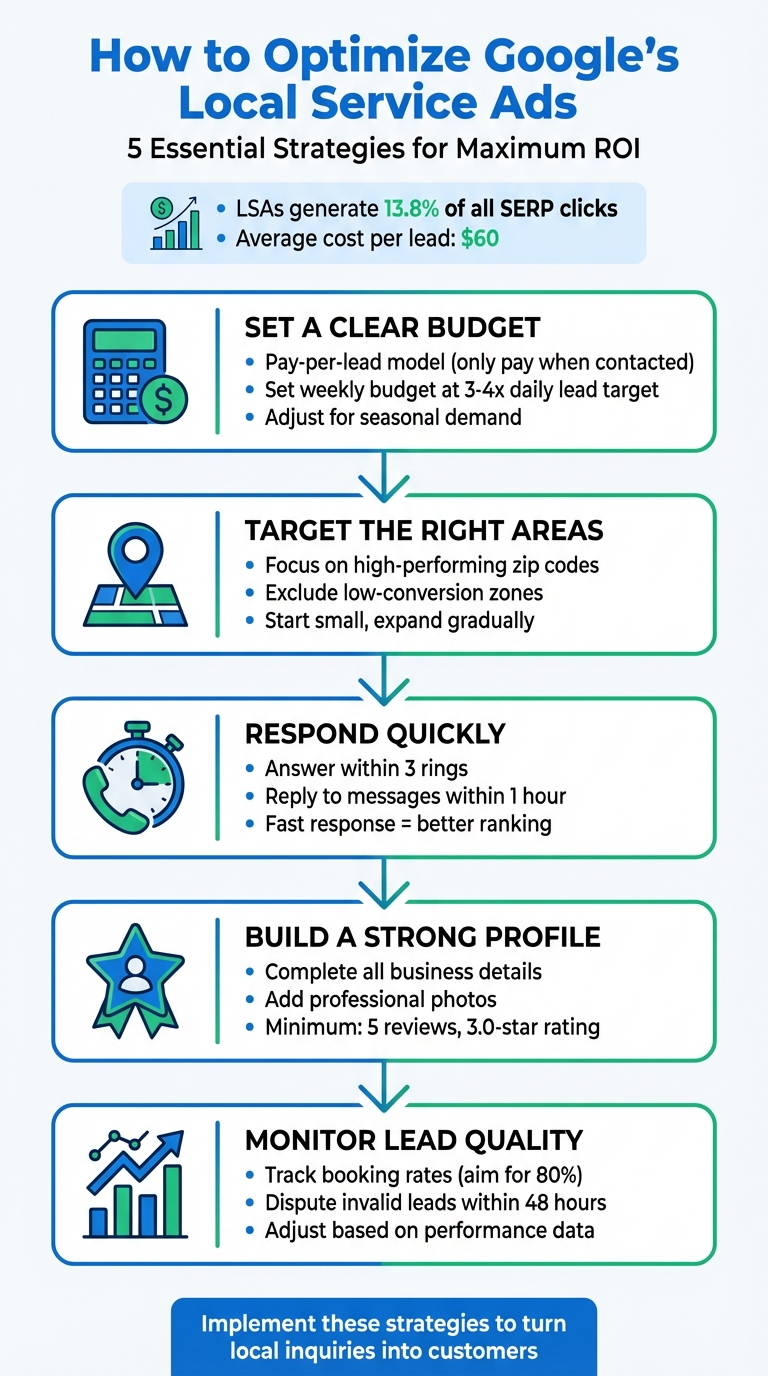
5 Key Strategies to Optimize Google Local Service Ads
Your budget plays a key role in determining how often your ads appear and how many leads you can secure. Local Services Ads (LSAs) operate on a pay-per-lead model, meaning you only pay when a potential customer reaches out to you. While this approach simplifies ad spending compared to traditional methods, having a well-thought-out strategy is essential to get the most out of your investment. Below, we’ll cover how to structure your weekly budget, track bid performance, and adjust for seasonal demand.
Google suggests basing your weekly budget on the average number of leads you aim to receive. A good rule of thumb is to set your weekly budget at three to four times your daily lead target. Here’s how Google explains it:
"You’ll start by setting a weekly budget, based on how many leads you want to receive (on average) weekly." – Google Business Profile
Your monthly maximum is automatically calculated by multiplying your weekly budget by the average number of weeks in a month. Once you hit this cap, your ad stops running until the next month unless you increase your budget. To get a clearer idea of costs, you can use Google’s budget calculator on the Local Services Ads homepage. This tool estimates expenses based on your industry and the number of leads you want each month. Keep in mind that lead prices vary depending on factors like location, service type, and competition in your area.
Keeping an eye on your leads is critical to understanding how well your budget is working. Regularly check the "Leads" section in your LSA dashboard and mark conversions as booked. Maintaining an 80% booking rate can improve your ad visibility and attract higher-quality leads. If a lead doesn’t result in a booking or sale, you have the option to dispute it, which can help you avoid unnecessary charges and maintain a strong success rate. Aligning your budget with lead quality ensures you’re getting the best value from your ads.
Certain times of the year bring higher demand for specific services, so it’s wise to adjust your budget accordingly. For instance, accountants may need to allocate more during tax season, while HVAC businesses might see a surge in demand during extreme weather months. If you’re testing a new service category, start with a conservative bid and increase it as you see better results. It’s also important to update your business hours regularly, especially during holidays or seasonal shifts, to ensure your ads display accurately. By reviewing your budget and return on investment frequently, you can make smarter adjustments that keep your spending aligned with your goals throughout the year.
To improve your Local Services Ads (LSA) performance, it’s crucial to target the right service areas. This means finding a balance – casting too wide a net can waste money on leads you can’t serve, while being too selective might cause you to miss out on potential customers nearby. The key? Refine your target area to ensure your ads reach the local audience most likely to respond.
Start by defining a radius around your office and pinpointing specific zip codes, neighborhoods, or counties where you want your ads to appear. Focusing on a smaller, high-performing area often delivers better results than spreading your budget across a larger region. For instance, instead of targeting the entire Dallas metro area, a plumber might zero in on Uptown, Highland Park, and University Park – areas with higher demand and better conversion potential.
As your campaign runs, analyze the data to identify zones that aren’t delivering results. If certain areas consistently underperform, exclude them from your targeting. Once your core area is performing well, you can gradually expand into nearby high-value zip codes to grow your reach.
After setting up your service areas, it’s essential to measure how well they’re performing. Use LSA reports to evaluate area-specific results and track call data to see which zones generate quality leads. While Google’s call tracking provides basic insights, third-party tools can offer more detailed metrics like call quality and duration.
Focus on key performance indicators such as lead volume, conversion rates, and return on investment for each area. If leads from certain neighborhoods consistently turn into bookings while others don’t, adjust your strategy. A CRM system can also help you organize leads by location and track their progress from inquiry to sale. Shift your budget toward areas with higher conversion rates and scale back investment in zones that aren’t delivering results.
Responding quickly to customer inquiries isn’t just good business – it directly impacts your Local Services Ads (LSA) ranking and conversion rates. Google monitors how fast you respond to calls and messages and uses this data to decide where your ads appear in search results. If you’re slow to respond or frequently miss calls, your ad ranking can take a hit, resulting in fewer leads coming your way. In short, quick responses are key to getting the most out of your ad campaigns.
"Not only does Google display response times on your listing, but it also factors this time into your ad rank." – Amanda Rodhe, Hatch
Customers often compare multiple providers before making a decision. The business that responds first – and does so professionally – usually wins the job. Having accurate business hours is a simple yet vital step in ensuring you’re ready to respond promptly.
Just like targeting and budgeting determine where and when your ads appear, setting precise business hours ensures you’re available to handle inquiries. Make sure your LSA and Google Business Profile hours match up, and only run ads during times when you can respond immediately. Inconsistencies can confuse customers and hurt your credibility.
Keep your hours updated, especially during holidays, seasonal changes, or temporary closures. If you provide emergency services, clearly note those hours as well. Running ads around the clock when you can’t answer calls 24/7 not only wastes your budget but also negatively affects your responsiveness score.
Accurate business hours set the stage, but fast response times seal the deal. Answer calls within three rings whenever possible. Missed a call? Return it right away and log the attempt in your LSA system. If you’re too busy to keep up, consider using an answering service or an AI tool to ensure no lead is left hanging.
For message-based leads, speed is just as important. Aim to reply within an hour. If that’s not feasible, use automated responses to acknowledge the inquiry while your team works on a more personalized follow-up. Regularly check your response times through the LSA dashboard to spot areas for improvement. The faster and more consistent you are, the better your rankings – and your chances of converting leads into customers – will be.
Your business profile plays a key role in how well your Local Services Ads perform. Google uses the details in your profile to generate search results, so having a complete and polished profile helps you stand out. It also builds trust with potential customers and signals to Google that your business is active and reliable, increasing your chances of being promoted. Reviews are another critical factor – they affect your ad’s visibility and ranking, making them essential for success.
Start by ensuring your profile includes all the basics: your business name, service types, service area, contact information, and accurate operating hours. Add professional photos of your team, work samples, or office space. High-quality images not only demonstrate your professionalism but also help your ad catch the eye of potential customers.
Be thorough when listing your services and specializations. The more specific you are, the better your chances of matching with what customers are searching for. For instance, instead of just listing "plumbing", include detailed services like "leak repairs" or "water heater installation." Write a compelling description that highlights what sets your business apart – mention certifications, awards, years of experience, or any unique expertise.
Take advantage of features like message leads, direct business search, and booking options. These tools make it easier for customers to contact you and can boost engagement with your ad. Once your profile is complete, shift your focus to gathering reviews, as these are crucial for building trust and improving your rankings.
A well-rounded business profile lays the groundwork for an effective review strategy. Google typically requires at least 5 reviews and a 3.0-star rating for your ad to appear, though the exact requirements can vary by industry. To build your review count, ask happy customers for feedback right after their experience and follow up within 24 to 48 hours. Make the process simple by providing a direct link to your review page via email or text.
Respond to every review within 24 hours, whether it’s positive or negative. Address specific points mentioned by the customer, maintain a professional tone, and offer further assistance if needed. This not only shows that you value feedback but also reassures potential customers that you’re attentive and responsive. Keep an eye on your review frequency and overall ratings, and tweak your approach as needed. A strong collection of reviews doesn’t just improve your ad’s ranking – it also makes customers more likely to choose your business over competitors.
Even with a well-optimized profile, it’s essential to keep an eye on lead quality and ad performance. Not every lead will turn into a booking, and some issues can drag down your results. Luckily, Google offers tools to dispute invalid leads and refine your targeting. Plus, your campaign data can reveal opportunities to improve. Building on earlier tips for managing your budget and enhancing your profile, this section focuses on using data and feedback to fine-tune your campaign.
Low-quality leads – like wrong numbers, irrelevant inquiries, or spam calls – are a common challenge. Short calls, for instance, can signal a lack of genuine interest, as longer conversations often indicate more qualified leads.
To avoid wasting money on these leads, Google lets you dispute them and request credits. Stay proactive by checking your Local Services Ads (LSA) dashboard every 2–3 hours and enabling mobile notifications. If you spot an invalid lead, submit a credit request within 48 hours, providing detailed evidence. Over time, this process helps Google’s algorithm better understand the type of customers you’re looking for.
If your ads aren’t showing up as often as you’d like, the problem might lie in your business profile, response times, or lack of reviews. Google ranks Local Services Ads based on factors like responsiveness, customer reviews, proximity, and service relevance.
Double-check your profile and response settings to ensure everything is up to par. These steps align with earlier advice on maintaining a strong online presence. Also, aim to collect at least five customer reviews with an average rating of 3.0 or higher, as this is often the minimum standard in many industries.
Your LSA dashboard is a goldmine of information that can guide your strategy. Pay attention to trends in lead volume, call duration, credit approvals, and booking rates to identify what’s working. For example, if certain areas or times of day bring in better leads, adjust your targeting and budget to focus on those opportunities.
Keep an eye on your credit approval rates and fine-tune your criteria as needed. Regularly revisit your service categories, budget, and response processes based on the insights from your dashboard. These adjustments can make a big difference in the long run.
Every adjustment you make to your campaign shapes its effectiveness. Optimizing Google’s Local Service Ads (LSAs) isn’t a one-and-done effort – it’s an ongoing process that demands regular analysis and thoughtful changes. These methods can improve ad performance and turn more local inquiries into actual customers.
LSAs account for an impressive 13.8% of all SERP clicks when they appear. With an average cost per lead hovering around $60 – lower than traditional search ads – they offer a cost-effective way to connect with local customers who are ready to book.
Keep a close eye on campaign data, such as lead volume, call durations, and booking rates, to guide your adjustments. Start by implementing one or two of these strategies, then fine-tune your approach as you gather insights. Over time, consistent, targeted changes to your budgeting, targeting, response times, and profile quality will help you attract more qualified leads and grow your business. Regularly reviewing performance metrics is key to sustaining and building on these improvements.
To contest an invalid lead on Google Local Service Ads, head to your Local Services dashboard and locate the Manage Leads section. From there, identify the lead you wish to dispute, click on it, and follow the outlined steps to submit your dispute.
If you run into any issues or need additional help, you can contact Google Support. Make sure to include all relevant details about the lead to strengthen your case.
The cost of generating leads through Local Service Ads (LSAs) can vary based on a few key factors: your business location, the industry you operate in, and how many leads you’re aiming to secure each month.
For instance, if your business is in a competitive area or industry, you might face higher costs due to stronger demand. Similarly, setting a goal for a larger number of leads often requires a bigger budget to remain competitive in the ad space.
However, with a well-thought-out approach to managing these variables and optimizing your ad strategy, it’s possible to keep costs in check while still achieving a solid return on investment.
To climb the ranks and improve visibility on Google’s Local Service Ads (LSAs), start by prioritizing positive customer reviews. Encourage satisfied clients to leave feedback and ensure reviews stay current. A strong review profile can make a big difference.
Next, fine-tune your business profile. Add high-quality images that represent your services, fill out every detail, and double-check that your service categories are accurate and fully activated. A complete and polished profile is more likely to catch attention.
Speed matters too. Respond to customer inquiries promptly to showcase your reliability. Pair this with a well-planned budget to ensure you’re getting the best return on investment. Features like messaging and direct booking can also make it easier for potential customers to engage with your business.
Lastly, link your verified Google Business Profile. This step adds an extra layer of trust and credibility, which can play a key role in boosting your ad performance.


 Physical Therapy
 MedSpa
 Dental
 HVAC
HVAC Roofing
 Pest Control
 Cleaning Services
 Landscaping
 Hotel
Hotel Cruise
 Branding
 Content Marketing
 Email Marketing
 Graphic Design
 PPC (Online Ads)
 SEO (Search Engine Optimization)
 Website Design and Development
 Pest Control
 Plastic Surgeon
 Roofing